
AI observer for Counter-Strike 2
The camera that sees the fight coming.
yaibo gives CS2 broadcasts human-like camera switching without a dedicated observer behind every cut. It follows the build-up, stays with the action, and keeps every round easy to watch.
Closed beta. Secure your spot.
- Human-like switching
- Easy setup for Windows and CS2
- Low CPU usage, built for streaming PCs
Automatic observing for Counter-Strike 2
yaibo is a Windows desktop app that runs the spectator camera for you. It follows the action, keeps rounds readable, and brings human-like switching to CS2 broadcasts without adding another operator.
- Runs locally on your streaming PC
- Built specifically for Counter-Strike 2
- Covers full matches without constant manual input
- Works for solo streams, community cups, and tournament broadcasts
Great matches deserve a camera that can keep up
The problem
A missed duel can flatten the best round. So can a nervous camera that jumps between players every second.
- The camera arrives after the fight
- Fast back-and-forth cuts lose the story
- Manual observing adds another job to the production
yaibo keeps the match readable and puts the action on screen when it matters.
What you get
Better match flow with less manual camera work.
Show the build-up
The best moments start before the first shot. yaibo stays with developing plays so viewers see how the fight came together.
Let the moment land
Human-like switching gives each scene room to breathe. Fewer ping-pong cuts. Better timing. Cleaner rounds.
Run a leaner broadcast
Let yaibo handle standard observing while you focus on commentary, production, and the stream.
Built to observe. Designed to stay out of the way.
Human-like switching
yaibo knows when to hold, when to cut, and when to leave the camera alone.
Easy setup
Install the Windows app, copy the included GSI configuration, and connect CS2.
Low CPU usage
Built to stay light while CS2, OBS, and the rest of your broadcast stack do the heavy lifting.
Predictive coverage
Follows developing action instead of waiting for the kill feed.
Local by design
Live match processing stays on your streaming PC.
Made for CS2
Built around the pace, players, and round flow of Counter-Strike 2.
From install to live match
Install yaibo
Run the Windows app and link it to your yaibo account.
Connect CS2
Copy the included GSI file into the CS2 config folder and launch the game.
Start the broadcast
yaibo takes care of the spectator camera while you run the rest of the show.
Watch the current yaibo in action
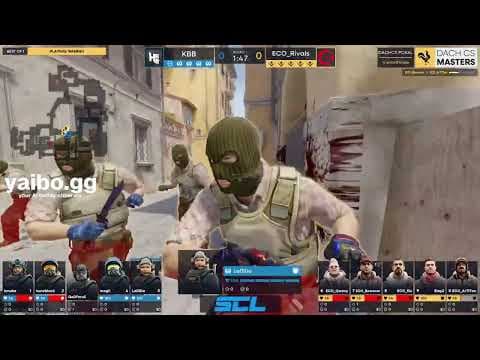
See the current version of yaibo handle the spectator camera in a real Counter-Strike 2 broadcast. Human-like switching, automatic coverage, and no manual camera input.
YouTube is blocked until you choose to load the video. Loading it sends data to YouTube. See our Privacy Policy for details.
Where yaibo fits into your broadcast
One less role to cover
yaibo handles the camera while you focus on commentary, production, and the stream.
- Holds through the build-up
- Moves before the moment is gone
- Avoids nervous back-and-forth cuts
- Keeps full rounds easy to follow
Built for real CS2 broadcasts
Built for streamers, community tournaments, and broadcast teams.
Solo streamer
Commentate, run OBS, and keep the show moving while yaibo covers the camera.
Community tournaments
Give every match consistent coverage, even when observer staff is limited.
Small production teams
Put more attention into commentary, graphics, and match operations without leaving the spectator camera unattended.
Tournament broadcasts
Use yaibo for automatic match coverage or as a backup when no human observer is available.
Questions before you go live
Made to stay out of the way
yaibo keeps the camera moving without becoming another production problem.
- Human-like switching
- Easy setup for Windows and CS2
- Low CPU usage
- Local live match processing
FAQ
Short answers for busy broadcast teams.
CS2 observing, explained
The essential terms behind yaibo and automatic Counter-Strike 2 broadcasts.
- AI observer
- Software that controls the spectator camera automatically during a match. yaibo follows the action and chooses the player view shown on stream.
- CS2 observer
- The spectator role responsible for deciding which player and moment appears on the broadcast.
- Automatic observing
- Camera coverage that runs without someone making every switch by hand.
- Human-like switching
- Camera timing that holds through developing plays, avoids nervous back-and-forth cuts, and moves when another view tells the story better.
- GSI (Game State Integration)
- Counter-Strike 2's built-in way of sharing live match information with local software such as yaibo.
- Local processing
- Live match information is handled on the streaming PC, keeping yaibo fast and independent from cloud processing during the match.
- VConsole
- The Counter-Strike 2 connection yaibo uses to control the spectator camera.
Closed beta
Stop chasing the kill feed.
Put a human-like observer on your next CS2 broadcast. Apply once and we will contact you when a closed beta slot opens.